我管理 Helm chart 的慣例
每個 chart 我會開一個目錄,維護四個檔案:
init-repo.sh:加入 repo 的指令,記錄 repo 是怎麼加的。upgrade.sh:安裝與升級的指令,通常是helm upgrade --install,並用--version固定 chart 版本。values.yaml:先用helm show values <chart>取得可調整的設定,再改成自己要的。不用--set是因為設定只存在指令列裡,事後很難回想當初設了什麼。README.md:說明文件。
這些都是純文字檔,可以直接納入版本管理。
為什麼需要 helm-diff
最近用 Claude 整理自家的 k8s,發現有些 release 是早期直接下指令裝的,沒有照上面的慣例留下 values.yaml。要把它們補回來,得先確認「我補寫的 values.yaml 和叢集裡實際在跑的設定一致」,Claude 建議我裝 helm-diff 這個 plugin 來比對。
helm-diff 會把「chart 加上你的 values」算出來的 manifest,拿去和叢集裡該 release 目前的 manifest 比較,像 git diff 一樣列出差異。它只做比對,不會改動叢集。
安裝
Helm 4:
curl -sL https://github.com/databus23.gpg | gpg --import
gpg --list-keys --with-fingerprint EA17A2A206AFF8CD
# 指紋應為:C5645EF4 7482257A 1F806D2B EA17A2A2 06AFF8CD
helm plugin install https://github.com/databus23/helm-diff/releases/latest/download/helm-diff-linux-amd64.tgz
Helm 4 安裝 plugin 時預設會驗證來源證明(provenance),確認檔案確實由作者簽署、沒有被竄改,所以要先匯入作者的 GPG 公鑰,並核對指紋。只有直接指向 tarball 的網址才支援驗證。檔名裡的 linux-amd64 請依自己的作業系統與架構,到 releases 頁面挑對應的檔案。
Helm 3(需 3.18 以上):
helm plugin install https://github.com/databus23/helm-diff使用
升級前先看會改什麼。參數和 upgrade.sh 裡的 helm upgrade 保持一致即可:
helm diff upgrade ngf <chart> -n nginx-gateway --version <版本> -f values.yaml -C 3-C 3 是只顯示差異前後 3 行,不加的話會印出完整 manifest。Secret 的內容預設會遮蔽。
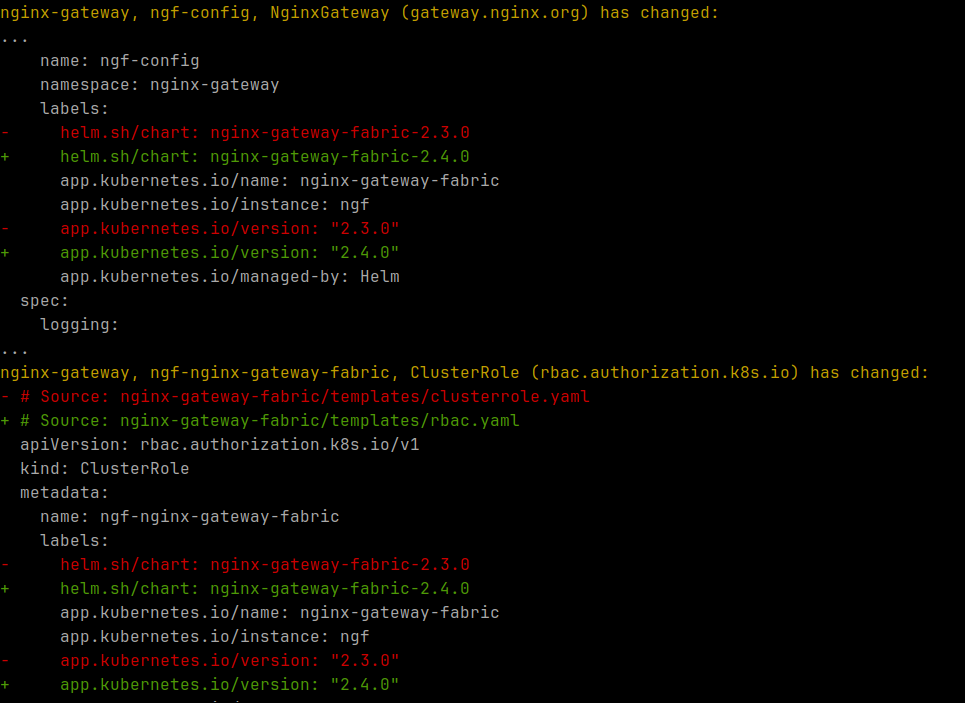
rollback 前先看退回某個 revision 會改什麼:
helm diff rollback ngf 1 -n nginx-gateway把手動安裝的 release 補回慣例
- 取出當初安裝時給的設定:
helm get values ngf -n nginx-gateway -o yaml > values.yaml - 用
helm list -n nginx-gateway確認目前的 chart 版本,寫進upgrade.sh。 - 執行上面的
helm diff upgrade。沒有任何輸出,就代表這份values.yaml和線上設定一致,可以放心納入版本管理。
其他常用的子指令
upgrade:升級會改什麼rollback:rollback 會改什麼revision:比較同一個 release 的兩個 revision,例如helm diff revision ngf 1 2release:比較兩個 release,例如 prod 和 staging
要注意 helm-diff 預設是和 Helm 記錄的上一版 manifest 比。如果有人用 kubectl edit 直接改過資源,要加 --three-way-merge 才會和叢集的實際狀態比對。
